
Enquiry Management: Release Notes
What's New in Enquiry
Release Date: 28 July 2026
A summary of the latest enhancements to the Enquiry module available to all schools.
- Module: Enquiry Management
- Document Type: Enhancement / Release Highlights
📌 OVERVIEW: Enhancements at a Glance
We’ve rolled out a set of enhancements to the Enquiry module that help every school capture leads better, act on them faster, and understand how enquiries convert into admissions. The highlights below are available to all schools:
- Color Badges Based on Enquiry Stage — Every enquiry is displayed with color-coded badges based on age, activity, and status.
- Filters — Built-in filter enquiries by individual columns such as Channel, Enquiry For, Status, and more.
- Unattended Leads Tracking — Automatically surface inactive leads needing action
- Enquiry Summary & Conversion Analytics — New KPI dashboard with source & conversion insights
- Customize Columns — Choose exactly which columns to show in the enquiry list
1. Stage Colour Badges
Every enquiry now carries a colour-coded badge — its Stage Colour Badge. The colour is set automatically, based on the lead’s status, its age and its recent activity — so how a lead is doing, and how urgently it needs attention, is clear at a glance without opening the record.
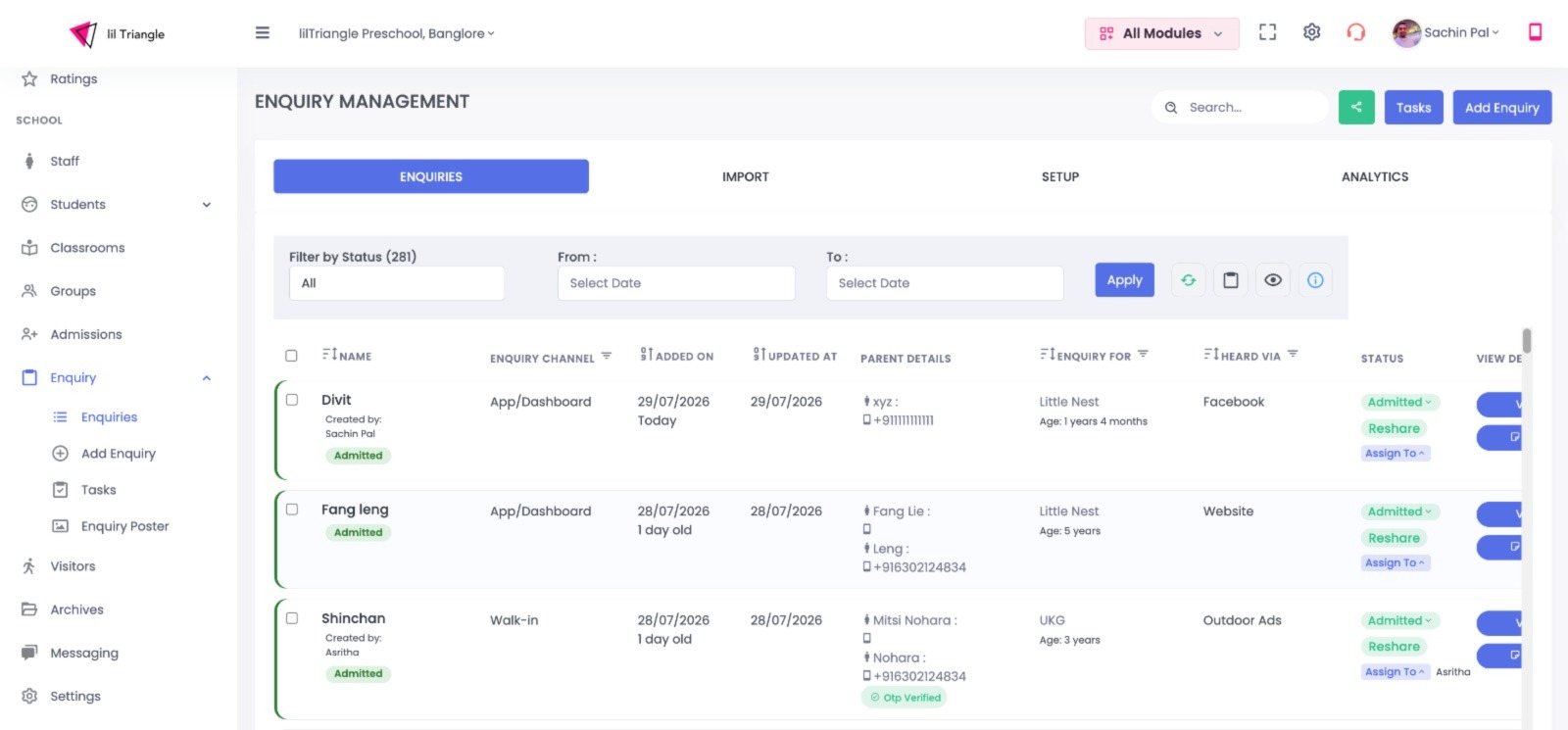
What decides the colour
- Status: where the lead sits in the journey: Enquired, Warm, Hot, Follow Up, Admitted, Lost…
- Age: how long since the enquiry was created.
- Activity: when it was last worked, and whether a follow-up is due.
Status Guide
The built-in Status Guide lists every badge and its meaning: New, No Action, Active, Overdue, Admitted, Closed and Deleted.
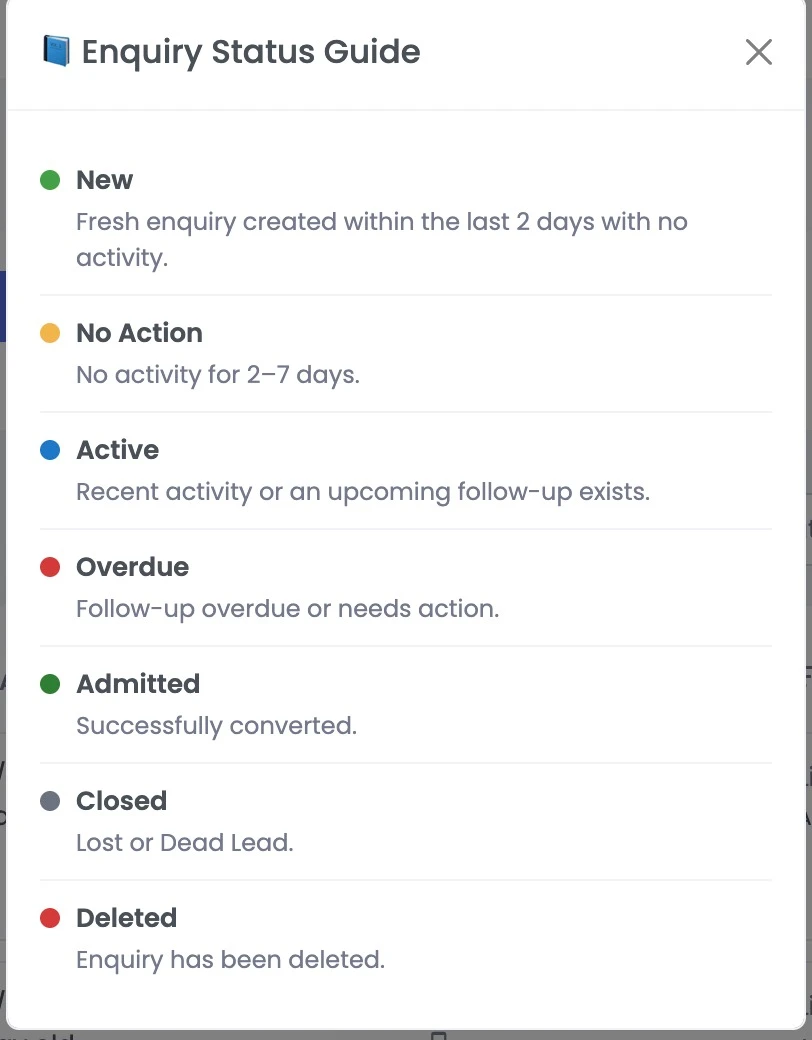
Why it helps: staff can scan the whole list and instantly see which leads are hot, which are going cold, and which are already won no clicking into records.
2. Filtering
Beyond filtering by status, the enquiry list now lets you filter directly on two key columns Enquiry For and Heard Via using the filter icon in each column header.
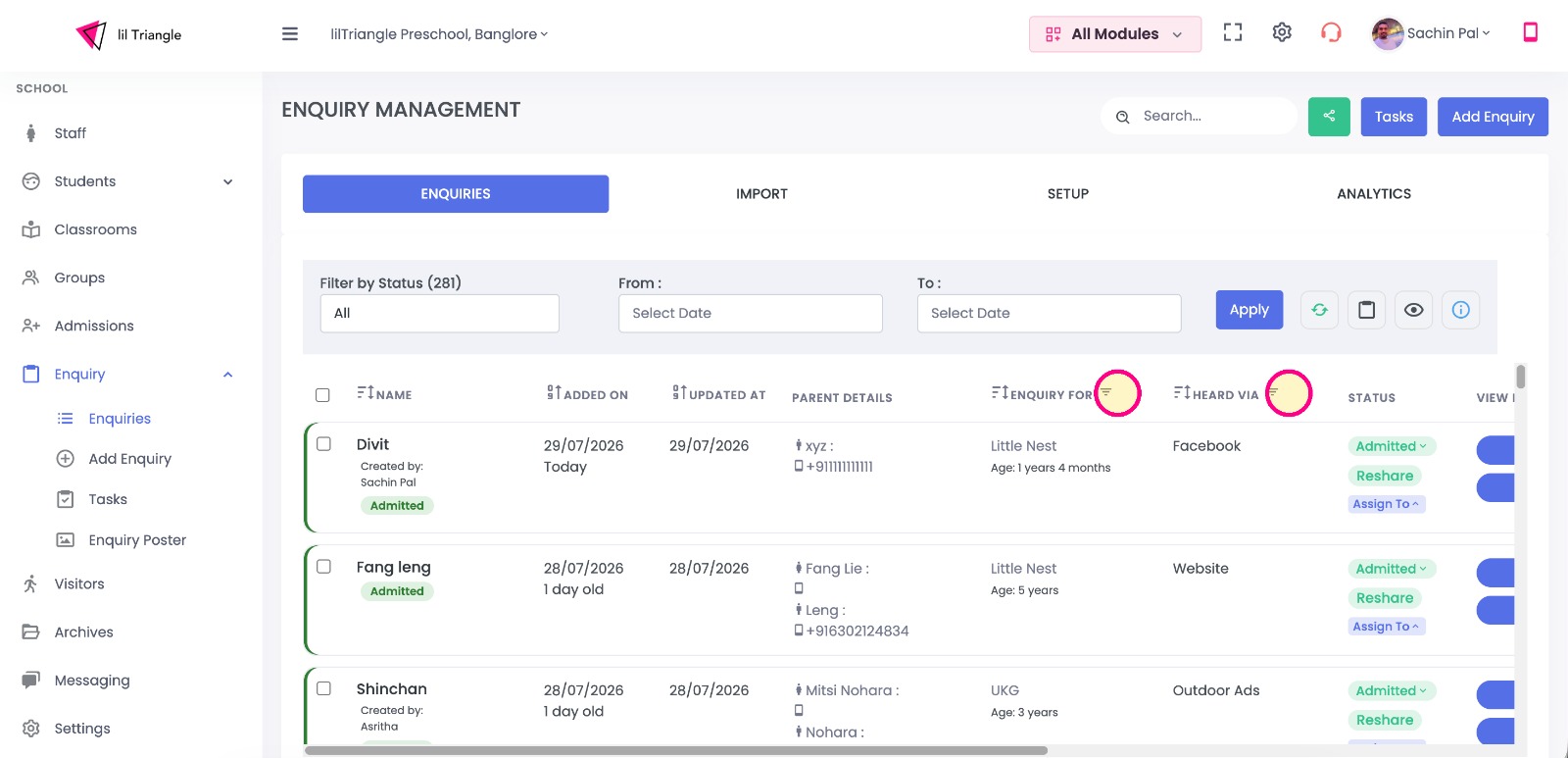
Filter by Enquiry For & Heard Via
- Enquiry For: filter by the programme or class the family is interested in: Little Nest, Nursery, LKG, UKG, Daycare...
- Heard Via: filter by how the family found the school: Website, Facebook, Social Media, Outdoor Ads...
- Both work alongside Filter by Status and the date range, so you can narrow the list to exactly the leads you want.
Why it helps: quickly focus on one class or one enquiry source for example, all LKG enquiries that came in via Website and work just that group.
3. Unattended Leads Tracking
A new filter inside the Enquiry Report surfaces leads that have gone quiet — so no potential admission slips through the cracks. The report can be generated by type and date range and downloaded for offline review.
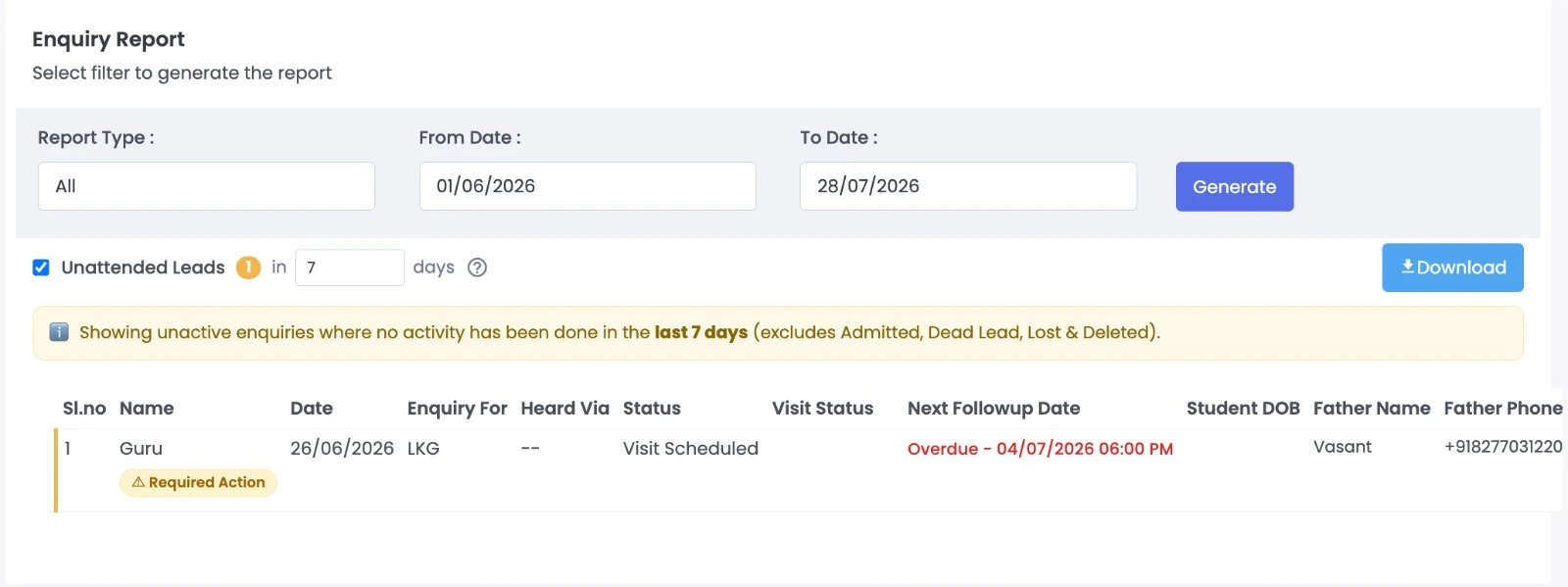
What’s New
- On-Screen Guidance: An info banner explains the filter in plain language:
"Showing inactive enquiries where no activity has been done in the last 7 days (excludes Admitted, Dead Lead, Lost & Deleted)."
- Custom Window: Enable the Unattended Leads toggle and set your timeframe — "in N days" (default is 7 days).
- Winnable Focus: Naturally-closed leads are automatically excluded — Admitted, Dead Lead, Lost, and Deleted — keeping the focus strictly on actionable leads.
- Visual Badges: A count badge displays how many leads currently need attention, and each qualifying row is flagged with a Required Action badge.
- Export & Assign: Download the generated list to assign directly to your admissions team.
4. Enquiry Summary & Conversion Analytics
A new one-glance analytics panel turns raw enquiry data into conversion insight — headline KPIs plus breakdowns by status, source, and visit outcome.
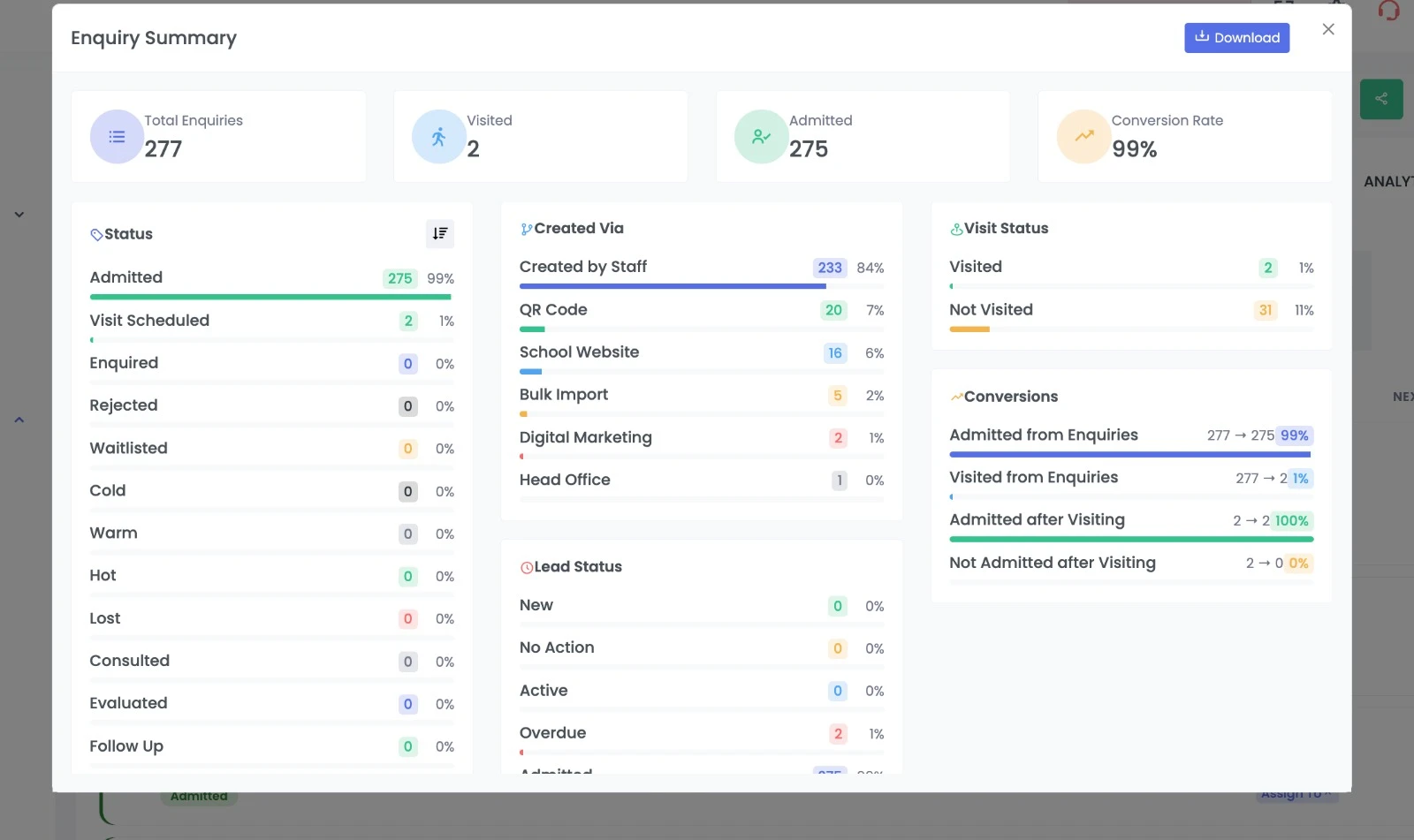
New Headline Metrics
- Total Enquiries
- Visited
- Admitted
- Conversion Rate
(Each school sees its own live figures calculated for the selected date range)
Breakdown Panels
- Status: Distribution across every stage, displaying both count and percentage.
- Created Via: Identifies which channel produced each lead (Created by Staff, QR Code, School Website, Bulk Import, Digital Marketing, Head Office).
- Visit Status: Visited vs. Not Visited counts.
- Lead Status: Activity health indicators (New, No Action, Active, Overdue, Admitted).
- Conversions: Funnel ratios including Admitted from Enquiries, Visited from Enquiries, Admitted after Visiting, and Not Admitted after Visiting.
- Download: Export the complete summary as a shareable report.
💡 Decision Support: By pairing source breakdowns with conversion ratios, school leaders can now see which channels bring the most enquiries and which actually convert to admissions — guiding where to invest marketing effort effectively.
5. Customize Columns
Every school works differently — now each user can choose exactly which columns appear in the enquiry list, so the table shows only the information that matters to them.
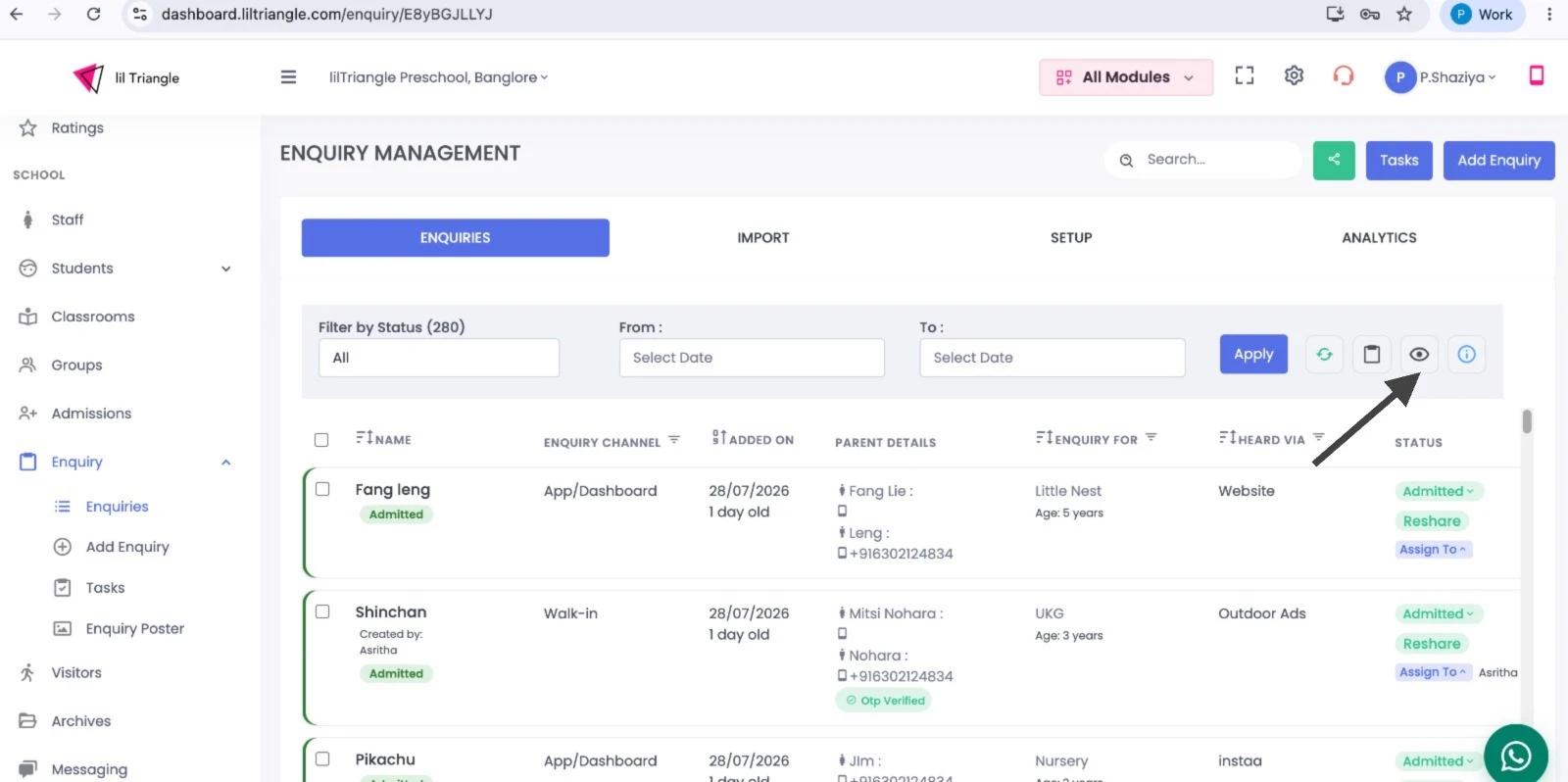
What’s New
- Column Chooser Icon: The new Customize Columns option (👁️ icon) in the enquiry toolbar opens the column chooser panel titled "Choose which columns you want to display".
- One-Click Visibility: Toggle each column on or off with a single click — the eye icon (👁️) marks visible columns, while a crossed-eye icon marks hidden ones (e.g., Updated At, Visit Status).
- Configurable Columns Include: Name, Enquiry Channel, Added On, Updated At, Parent Details, Enquiry For, Source, Status, Visit Status, Next Followup Date, and View Details.
- Instant Reset: Quick Hide all / Show all buttons let you reset the view instantly.
- Persistent Preferences: The chosen layout is remembered, so staff keep their preferred view every time they return.
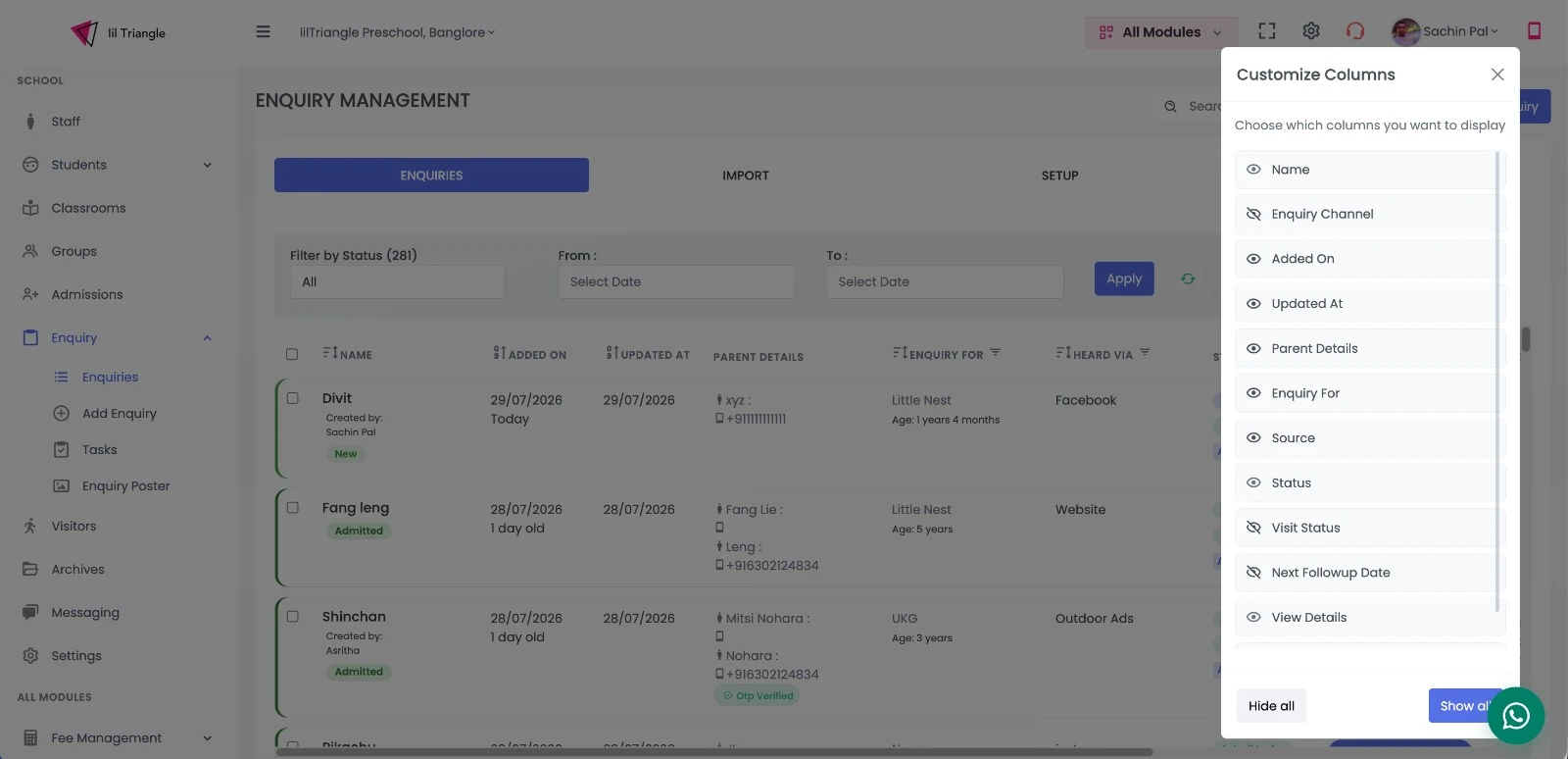
💡 Why it helps: A lighter, focused table for day-to-day work — each school (and each staff member) sees only the columns they use, without scrolling past fields they don’t need.